


Need more help?
See the most commonly asked questions for your product, whether it’s a Roller, Roman or Wooden blind, or the Smart Hub. We’re here to help you get the most of your window dressings.
Find answers to our most commonly asked questions to get your electric blinds and Somfy Hub working as they should.
Make sure you’ve set the remote to the right channel for your blind, and change channel if necessary. Look at the red LEDs at the bottom of the remote to know which channel is selected.
The motor may need to be recharged.
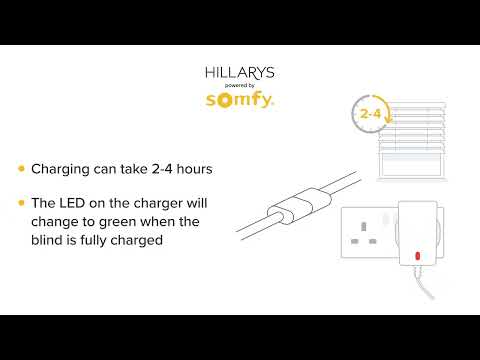
Charge the motor using the mains charger supplied with your blinds. It will take 4 to 6 hours for the motor to fully charge.
If this doesn’t help, you might need to replace the battery in your remote.
Contact your local Hillarys advisor or Download the PDF programming instructions.
Tip: If you’ve had your blinds for more than 2 years, the remote battery may need to be changed. You’ll need a CR2032 coin battery.
If the remote still doesn’t work after you have changed the battery, the external battery might be disconnected. Check that the motor is plugged in to the battery correctly.
Remove the back cover of your remote by using a + head screw driver.
Carefully pull the back cover off your remote. This is held in place with plastic clips.
Tip: To help lever the cover off, use an old loyalty or credit card. Don’t use a flat head screwdriver as this may cause damage to the plastic.
CR2032 coin battery
On an average sized blind of 120cmx 120cm operating twice a day, the motor battery should last 6 to 9 months. This will vary depending on the size of your blind and how often you use the motor system.
Look at the charging port to see if the pins are damaged or broken. If you find a pin that is bent, don’t try to straighten it. You will need a replacement motor to solve this issue. Please contact Hillarys’ customer service on 0808 239 7438
Check the Hub is online via the small LED on the bottom of the Smart Hub. Each LED light indicates a different situation:
If the device is online then proceed to test the blind with the remote. if the blind does not operate it may require charging.
Check that the device has an internet connection by asking the below commands:
If you don’t have an internet connection Alexa should answer with ‘I’m having trouble understanding right now’ and the light ring will turn red.
If the device is not connected to the internet it’s likely your internet is down, so contact your internet provider.
If the device is connected to the internet, make sure you’re using the correct command to operate the blinds. Test this, by seeing if you can open all blinds in a single room by stating the relevant command:
Ensure the timers are switched on by opening the app. Navigate to the Timer screen and ensure the switch in the centre of the screen is green. If this isn’t green simply click it to activate.
See the most commonly asked questions for your product, whether it’s a Roller, Roman or Wooden blind, or the Smart Hub. We’re here to help you get the most of your window dressings.
See the most commonly asked questions for your product, whether it’s a Roman blind or Wooden blind, or the Smart Hub, we’re here to help you get the most of your window dressings.
Information about your order >
How do I rearrange my appointment if I feel unwell?
If you feel unwell, or you or someone in your household has any symptoms of Coronavirus, we ask that you call us on 1800 882 917 to rearrange your appointment.
I am self-isolating can I book an appointment?
For the welfare of our colleagues, we will only be carrying out in-home appointments where we can safely do so. If you, or someone in your household is vulnerable or is experiencing Coronavirus symptoms, please contact our customer service team on 1800 882 917 for further advice.
What protective clothing will the advisor be wearing?
Our advisors will be wearing face masks, gloves and shoe coverings. They also have hand sanitiser and disinfectant wipes.
How will you ensure social distancing whilst choosing/suggesting the right blind, curtains or shutter for me?
Your advisor will stay 2 metres away during your in home appointment, whilst you’re discussing the best solution for your windows your advisor can hold up appropriate samples and discuss from a safe distance.
Will I be able to browse the advisors sample books during the appointment?
Your advisor will bring a range of samples for you to choose from, your advisor can hold the samples up for you to take a look at. For a closer look, we’d ask that you wear gloves whilst you handle the fabrics if at all possible. Your advisor will also be able to order samples to be delivered to your home after your appointment.
Does it matter if I haven’t ordered/received my samples ahead of my appointment?
Don’t worry if your samples haven’t arrived or if you need a little help in selecting your products, your advisor will bring the appropriate samples along to your appointment. You can view the books in home and your advisor can hold up the samples for you to view at the window. For a closer look, we’d ask that you wear gloves whilst you handle the fabrics if at all possible. Your advisor will also be able to order samples to be delivered to your home after your appointment.
Do I need to stay in the room whilst the advisor fits my new window dressings?
Our preference would be for the advisor to be left in the room whilst they fit your new window dressings, if you feel comfortable with that.
How many people from Hillarys will attend the appointment?
There will be just one advisor at your appointment, if for any reason there needed to be another person present, you will receive a phone call ahead of the appointment to check that you would be happy with that.
I don’t want to use the chip and pin machine, is there another way to pay?
Don’t worry, your advisor will have disinfectant to clean the chip and pin machine ahead of use, alternatively you can call a telephone payment service using your own telephone.
I’m waiting for an update on my order, how can I find out when it will be fitted?
We are calling all customers who still have an order outstanding to confirm the next steps and to book a fitting appointment. Social distancing means our team is smaller than at other times and getting through to all of our customers is taking longer than we would like. Please be patient with us, we are sorry for the delay and will be in touch with you as soon as possible. If you would like to get in touch with us about your order, email [email protected] including your address and order number. We will aim to get back to you within 36 hours.
I am waiting for my products to be fitted, when will this be?
We are busy calling all customers who still have an order outstanding to confirm the next steps and hopefully book a fitting appointment. Please be patient we will be in touch with you. Apologies for the delay, we are working through the changing circumstances as quickly as possible.
How are you following social distancing at your head office?
Where possible, are head office team is working at home. Where teams need to be in the workplace, for example our manufacturing and customer service teams, we have taken steps to make the workplace as safe as possible. This includes social distancing measures and working in smaller teams. Please be patient with us while things take a little longer.
I’m pressing the remote but nothing is happening.
Make sure you’ve set the remote to the right channel for your blind, and change channel if necessary. Look at the red LEDs at the bottom of the remote to know which channel is selected.
I have the right channel selected on my remote, but my blind still isn’t working
The motor may need to be recharged.
Charge the motor using the mains charger supplied with your blinds. It will take 4 to 6 hours for the motor to fully charge.
If this doesn’t help, you might need to replace the battery in your remote.
Tip: If you’ve had your blinds for more than 2 years, the remote battery may need to be changed. You’ll need a CR2032 coin battery.
If the remote still doesn’t work after you have changed the battery, the external battery might be disconnected. Check that the motor is plugged in to the battery correctly.
How do I replace the batteries in my remote?
Remove the back cover of your remote by using a + head screw driver.
Carefully pull the back cover off your remote. This is held in place with plastic clips.
Tip: To help lever the cover off, use an old loyalty or credit card. Don’t use a flat head screwdriver as this may cause damage to the plastic.
What kind of batteries do I need for my remote?
CR2032 coin battery
I’m pressing ‘down’ on the remote, but the blind goes up.
Your remote is in reverse setting and needs to be reset. Follow the instructions below:
Position your blind away from the limits
Press and hold the ‘UP’ and ‘DOWN’ buttons at the same time until the blind jogs and the LED indicator flashes amber
Press and hold the ‘MY’ button until the blind jogs and the LED near the charging point of your blind flashes green 5 times.
The direction of the motor has now been reversed.
My remote is damaged. Where I can get a new one?
Please contact Hillarys’ customer service on 0808 239 7438
How long will the motor charge last?
On an average sized blind of 120cmx 120cm operating twice a day, the motor battery should last 6 to 9 months. This will vary depending on the size of your blind and how often you use the motor system.
My blind won’t charge.
Look at the charging port to see if the pins are damaged or broken. If you find a pin that is bent, don’t try to straighten it. You will need a replacement motor to solve this issue.
My blind is flashing.
The LED lights on the motor are to guide you when the blind is programming.
Solid amber – your blind is in pairing mode
Pulsing amber – your blind is paired and ready to accept limits
Flashing green - indicates signal from the remote
Flashing red – the limits are incorrect
Solid red – a thermal indicator telling you your blind is too hot
My blinds are running at different speeds.
Unfortunately, we can’t guarantee that motors will run at the same speed. This is due to various factors, like motor gearing and the weight, fabric and size of the blind.
How do I set a middle point using the ‘MY’ button?
Press the ‘UP’ or ‘DOWN’ button on your remote, then press ‘MY’ when you reach your preferred mid-point
Press and hold the ‘MY’ button until the blind jogs
The mid-point is now set
To get to the mid-point press the ‘MY’ Button
Can I start using my blinds straight after they have been fitted?
Your blinds will be partially charged when fitted, but we recommend letting them charge fully before you start to use them. Use the mains charger supplied to charge the motor for 4 to 6 hours.
What’s the best way to clean and care for my blinds?
Most of our blinds can be vacuumed using an upholstery attachment, or gently dusted with a clean, dry cloth. For deeper cleaning, certain blinds may be dry-cleaned only. For more information on cleaning each type of blind, visit our Blinds Care Guide.
I took my blind down to decorate and it no longer stops at the pre-set limits.
The motor could have moved while being stored, so you may need to reset the limits.
Do you offer a guarantee on my blinds?
Yes, we offer a full 12 month warranty which covers repairs or replacements to any faulty blinds.
I’m pressing the remote but nothing is happening.
Make sure you’ve set the remote to the right channel for your blind, and change channel if necessary. Look at the red LEDs at the bottom of the remote to know which channel is selected.
I have the right channel selected on my remote, but my blind still isn’t working
The motor may need to be recharged.
Charge the motor using the mains charger supplied with your blinds. It will take 4 to 6 hours for the motor to fully charge.
If this doesn’t help, you might need to replace the battery in your remote.
Tip: If you’ve had your blinds for more than 2 years, the remote battery may need to be changed. You’ll need a CR2032 coin battery.
If the remote still doesn’t work after you have changed the battery, the external battery might be disconnected. Check that the motor is plugged in to the battery correctly.
How do I replace the batteries in my remote?
Remove the back cover of your remote by using a + head screw driver.
Carefully pull the back cover off your remote. This is held in place with plastic clips.
Tip: To help lever the cover off, use an old loyalty or credit card. Don’t use a flat head screwdriver as this may cause damage to the plastic.
What kind of batteries do I need for my remote?
CR2032 coin battery
I’m pressing ‘down’ on the remote, but the blind goes up.
Your remote is in reverse setting and needs to be reset. Follow the instructions below:
Position your blind away from the limits
Press and hold the ‘UP’ and ‘DOWN’ buttons at the same time until the blind jogs and the LED indicator flashes amber
Press and hold the ‘MY’ button until the blind jogs and the LED near the charging point of your blind flashes green 5 times.
The direction of the motor has now been reversed.
My remote is damaged. Where I can get a new one?
Please contact Hillarys’ customer service on 0808 239 7438
How long will the motor charge last?
On an average sized blind of 120cmx 120cm operating twice a day, the motor battery should last 6 to 9 months. This will vary depending on the size of your blind and how often you use the motor system.
My blind won’t charge.
Look at the charging port to see if the pins are damaged or broken. If you find a pin that is bent, don’t try to straighten it. You will need a replacement motor to solve this issue.
My blinds are running at different speeds.
Unfortunately, we can’t guarantee that motors will run at the same speed. This is due to various factors, like motor gearing and the weight, fabric and size of the blind.
My blind is rising unevenly.
The inner workings of your blind may have become disconnected. Call Hillarys customer service on 0808 239 7438
My blind makes a noise but does not rise or lower.
The inner workings of your blind may have become disconnected. Call Hillarys customer service on 0808 239 7438
How do I set a middle point using the ‘MY’ button?
Press the ‘UP’ or ‘DOWN’ button on your remote, then press ‘MY’ when you reach your preferred mid-point
Press and hold the ‘MY’ button until the blind jogs
The mid-point is now set
To get to the mid-point press the ‘MY’ Button
Can I start using my blinds straight after they have been fitted?
Your blinds will be partially charged when fitted, but we recommend letting them charge fully before you start to use them. Use the mains charger supplied to charge the motor for 4 to 6 hours.
What’s the best way to clean and care for my blinds?
Most of our blinds can be vacuumed using an upholstery attachment, or gently dusted with a clean, dry cloth. For deeper cleaning, certain blinds may be dry-cleaned only. For more information on cleaning each type of blind, visit our Blinds Care Guide.
I took my blind down to decorate and it no longer stops at the pre-set limits.
The motor could have moved while being stored, so you may need to reset the limits.
Do you offer a guarantee on my blinds?
Yes, we offer a full 12 month warranty which covers repairs or replacements to any faulty blinds.
What does a Smart Hub do?
The Somfy Hub is an additional accessory allowing you to link Somfy electric blinds to a mobile app via one-way communication.
The Hub connects information from the blind, to WiFi, to the mobile device allowing you to control your blinds via your phone whether you're at home or anywhere else in the world
The Hub also lets you to set timers and voice controls via Alexa or Google Home devices.
What will the Smart Hub allow me to do?
Your Hub allowa you to control your blinds from anywhere in the world as long the WiFi in your home is connected and the Hub is enabled. You can set up timers and scenes to control different Smart home devices.
Why doesn’t Hillarys offer an installation service for the Smart Hub?
Hillarys will install and programme the blinds to work with the remote control only. The Smart Hub requires you to set-up an online account using an email address and password. In line with privacy policies, your personal details and mobile device should not be used by anyone else.
Do I need a remote if I plan to use a mobile and the Somfy Hub?
Yes, a remote is required to program the Hub. You’ll also need a remote as a backup in case you experience internet connection issues.
What do I need to make my blinds operate with a mobile or voice controls?
You will need a purchase a Somfy Hub along with your Somfy electric blinds. You will need a strong internet connection across the house.
Please ensure you have the following before purchasing a Hub:
WiFi Ethernet socket available to connect the Hub cables
Email address
Android or iOS device (download app)
Android 5. iOS 12 (iPhones 5s, 6, 6S, SE (version 2016), 7, 8, X, Xs, 11, SE (version 2020) and later). iPad iOS 10.
What if I do not have a spare Ethernet port in my WiFi router?
You can purchase a splitter or Ethernet adapter to allow you more than one device into the router.
I’ve set timers but they are not operating the blinds.
Open the app and go to the timers screen. Make sure the switch in the centre of the screen is green.
If this isn’t green, click it to activate.
If I have previously purchased electric blinds from Hillarys, can I make them ‘smart’ using a mobile or voice activation?
Hillarys sell a range of different products that have an electric option, but only the Somfy electric blinds can be sold with a Hub.
The Somfy Hub is an accessory which allows the blinds to connect to a mobile or voice activation.
Are Hillarys electric blinds compatible with Alexa and other voice assistants?
Both Google Home and Alexa are compatible with a Somfy hub.
Are Hillarys electric blinds compatible with Apple home kit?
Unfortunately, our electric blinds are not compatible with Apple home kit at this time.
My voice assistant is not operating my blinds.
Check that your device has an internet connection by asking the below commands:
Google Home –'Hey Google, are you connected to the internet?'
Alexa – 'Alexa, how are you feeling?'
If you don’t have an internet connection Alexa should answer with ‘I’m having trouble understanding right now’ and the light ring will turn red.
If your device is not connected to the internet it’s likely your internet is down, so contact your internet provider.
If your device is connected to the internet, make sure you’re using the correct command to operate the blinds. Test this, by seeing if you can open all blinds in a single room by stating the relevant command:
'Hey Google, open the kitchen.'
'Alex, open the living room.'
My blinds are no longer operating via the app.
You need to check that the Somfy Hub is online by looking at the small LED on the left-hand side of the smart hub.
Each LED light indicates a different situation:
Red LED – issue with the internet connection. Reboot the Somfy Hub by turning it off then back on. If this doesn’t help, contact your internet provider
Green LED – the system is online. Check your device is connected to the internet and try again.
Amber LED – system update is in progress. Wait 10 minutes then try again. A message will be displayed in the app if an update is taking place.
What happens to my personal information?
Your personal information is protected by EU legislation. Your details will never be disclosed to third parties without your approval first.
Do you offer a guarantee on my Hub?
Yes, we offer a full 12 month warranty which covers repairs or replacements to any faulty blinds.
The Somfy Hub enables you to control your blinds using a remote control or smartphone. Follow our video guide to get your Somfy Hub set up quickly and easily.
Whether you want to operate your blinds by a remote control or your smartphone, we've got the perfect solution for you. But first, you'll need to connect your blinds to the Somfy Hub. Our video will show you how.
The 'scenarios' or timer function lets you set your blinds to automatically open and close even when you're away from home. Find out how to set scenarios here.
Example of a damaged pin.
The LED lights on the motor are to guide you when the blind is programming.
Make sure you’ve set the remote to the right channel for your blind, and change channel if necessary. Look at the red LEDs at the bottom of the remote to know which channel is selected.
The motor may need to be recharged.
Charge the motor using the mains charger supplied with your blinds. It will take 4 to 6 hours for the motor to fully charge.
If this doesn’t help, you might need to replace the battery in your remote.
Tip: If you’ve had your blinds for more than 2 years, the remote battery may need to be changed. You’ll need a CR2032 coin battery.
If the remote still doesn’t work after you have changed the battery, the external battery might be disconnected. Check that the motor is plugged in to the battery correctly.
Look at the charging port to see if the pins are damaged or broken. If you find a pin that is bent, don’t try to straighten it. You will need a replacement motor to solve this issue.
You need to check that the Somfy hub is online by looking at the small LED on the left-hand side of the smart hub.
Each LED light indicates a different situation:
Open the app and go to the timers screen. Make sure the switch in the centre of the screen is green
Discover more tips and advice to create your perfect window dressing solution
Read our expert 'How to...' guides to keeping your blinds, curtains and shutters looking their best.
Read our top tips on finding the right blind for your window shape, whatever the style of your living room.
Read our top tips for choosing curtains and blind fabrics that work beautifully together.